14 November 2026 · 14 min read
How to run a small studio: yoga, barre, Pilates and dance
Short answer: a small yoga, barre, Pilates or dance studio runs on a week you can repeat, a room that isn't overfilled, and a simple way for people to book, pay and turn up. You don't need a chain's software, a shop, or an app in a store. You need a timetable, a fair way to charge, a habit for empty mats, and one link you can put in a message. This guide is that work. It's useful even if you never buy anything.
What the first year is really for
Opening week feels like the job. It isn't. The job is the twelfth week, when the novelty has gone and the same few people are deciding whether Thursday at 6:15 p.m. is part of their life.
A first studio is usually one room and a very small team. Yoga, barre, Pilates and dance look different on the floor and the same underneath. Someone has to decide what is on, who teaches it, how many people the room holds, how a person pays, and what happens when they don't come. Write those five answers down. A notebook is enough until you are copying it into a sheet, a story and a chat, and the three copies have drifted.
Most new studios over-build the week. A crowded timetable of quiet classes looks worse than a short one. Start with the hours you can teach well, often 8 to 12 classes, and add another only when a class is full and people are asking. The people who stay want the same teacher or a named cover, the same length, and a price they already agreed.
For three months, success is people who came at least four times, a week you did not rewrite every Sunday, and rent paid without a panic offer. Still choosing a space? Start with how to open a yoga studio. This guide starts once you have the keys.
A week you can keep
Pick the hours before the class names. For most small studios the slots that fill are early morning, a short lunch window, and about 5:30 p.m. to 7:30 p.m. Weekend mornings suit a slower practice. Put the class people already ask for into the strongest hour. Try a new format, or a newer teacher, off-peak, so an experiment does not empty the hour that pays the rent.
Leave fifteen minutes between classes in the same room, twenty if you can. A ten-minute turnaround starts with an apology. Name the class so a new person knows the bargain: day, time, length, level, and what the hour feels like. Pilates needs mat or reformer. Dance needs the style. Barre needs the length. Put that on the timetable, not only in a caption.
Publish Monday to Sunday in one place, and put the same week on the door. If the only timetable is a story, you are asking students to remember your business for you. Decide cover before you need it. If you are the only teacher, a canceled class with a clear note beats a pretense that nothing changed.
On Who's In Studio the week is a timetable you drag into shape. Each class repeats weekly. You set the room and the teacher, and the schedule warns you when either is in two places at once. A member books the next occurrence, and you choose when that booking opens. It is not a calendar of one-off classes. A workshop that happens once belongs on Events.
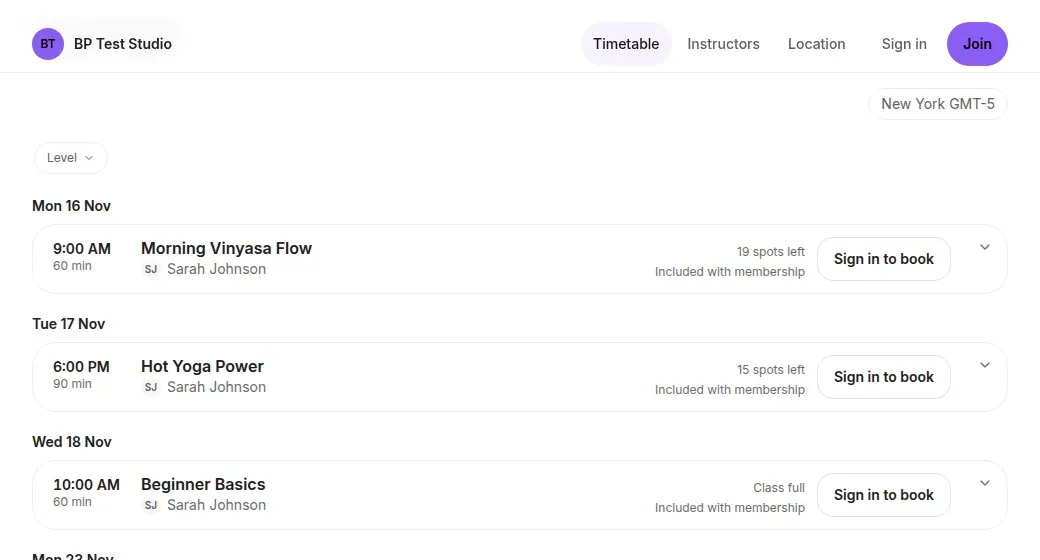
Peak hours and the seasons are in the studio class scheduling guide.
How full the room should be
Capacity is a promise. A yoga room that fits 12 mats with space to move is a 12-person class. Pilates is capped by the reformers, chairs or mats you own. Barre is the barre and the floor behind it. Dance needs room for a phrase, not just for standing. If one room holds more than one style, the cap can differ by class.
Keep the cap. "Usually 12, but we squeeze" is how regulars stop bringing friends. A full class that turns someone away kindly beats a packed room where nobody can move. The next person needs a waitlist, and a canceled spot should reach them without you messaging five people at 7:00 a.m. On Who's In, a full class takes a waitlist, and the next person is promoted and emailed when a spot opens. Tell students that, or they will still ask you and you will do the job twice.
A full class with a queue, for several weeks, is a second time, not a higher cap. A class under half full for a month should move, be renamed, or stop. Tell the people who came, point them at a class that is working, and take the quiet one off the week. Who's In can cancel a class under a minimum you set, a chosen number of hours before it starts, and email anyone booked. Use that while you are still testing an hour. A class that vanishes every week should be retired on purpose.
Track attendance and unused capacity so you can adjust the schedule to demand. Peak hours carry the week. Fill the hours you chose. Do not chase every quiet slot.
Pricing class packs and memberships
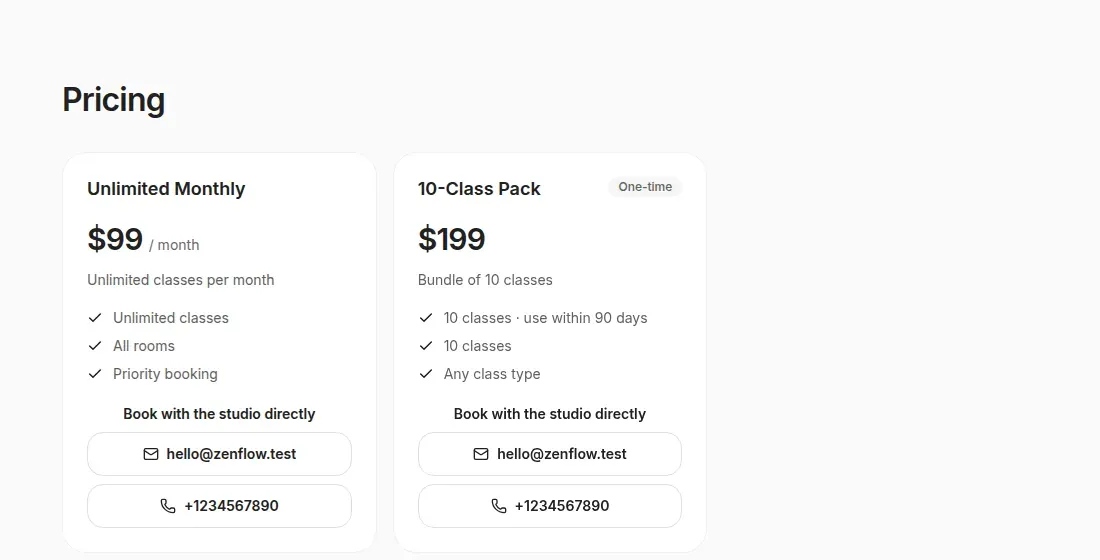
Charge for a habit. The people who keep a small studio going come every week, and the price they feel is the price of that week. Explain a monthly membership first: a set amount, and the classes that plan allows. You can think about rent from memberships. You cannot think about rent from whoever happens to walk in.
A class pack is for someone not ready to commit, or whose week changes. Price it so one class inside the pack costs less than a single class on its own, and more than one class on the membership for a person who comes as often as a member. If the pack is the cheaper way to attend three times a week, your regulars will buy packs and the income will jump around.
A first visit still needs a way in. On Who's In, class packs include single-class passes, and packs and memberships are sold online through Stripe. A drop-in taken at the door is recorded at the front desk. Publish the prices on the booking page and by the door, the same numbers. A quiet class is usually the slot or the teaching, not a reason for a new offer. If you do discount, put a date on it.
Say the late-cancel rule before anyone pays. On Who's In, a late cancellation of a booking made with a class pack uses that class from the pack, and no separate fee is recorded. Any other booking can record a fee for you to collect. One cost, not both. A short trial of a plan, up to 90 days where you allow it, is cleaner than a whispered discount. That trial belongs to the student.
Who's In Studio Starter is $19 a month for up to 99 active members, and every feature is on that plan. Studio Growth is $49 a month with no member cap. The plans are the same product. Starter moves up when you pass 99. There is a 14-day free trial. A card is taken at checkout and nothing is charged until the trial ends. Cancel before then and you pay nothing. On member payments the line is 0% Who's In fee (Stripe processing applies). The money goes to your own Stripe account.
If you already know you will stay, Starter is also $190 a year. The numbers to trust are on Studio pricing. Other tools are compared, with sources, in the cheapest booking software roundup and in Who's In Studio and Mindbody.
Reducing no-shows
A mat that was booked and stays empty is worse than a mat nobody booked. You can still fill the second one. People miss class because they forgot, work ran long, or Sunday's optimism did not survive Wednesday. You will not lecture that away. You can make the real plan easier to keep.
- Put the class where people can attend. An absence problem that is really a 2:00 p.m. problem will not yield to a stern rule.
- Take the money before the day. A membership or a pack is a decision. Count your own room. Do not borrow someone else's percentage and call it yours.
- Send one note, then stop. A pile of messages gets ignored. Who's In sends one reminder email the day before each booked class (within the hour for a later booking, if the class has not started). It is email only. There is no text message and no push.
- Use one cancellation rule for everyone. In time, the spot returns and the waitlist can move. Late on a pack, the class from the pack is used. Say so before they pay.
- Write down who did not come. A conversation comes first. If your rule includes a fee, you collect it at the desk. Who's In does not take an extra class off a pack because someone missed, and it does not charge that fee to a card by itself.
More tactics are in how to reduce studio no-shows. The aim is a room that matches the list.
Names, attendance and the desk
A small studio's advantage is that you know who is new, who is back after an injury, and who has not been in for three weeks. That only works if it is written down. One record per person is enough: name, email, what they bought, what they booked, whether they signed, and whether they came. Then you can stop asking "have you paid?" in the doorway.
Check people in as they arrive. On Who's In, check-in can be a QR scan at the desk, including from a membership pass in Apple Wallet or Google Wallet, one pass per membership. Attendance sits with the other numbers, so a quiet month is visible without rebuilding a sheet.
The waiver belongs before the first class. On Who's In, booking waits until the person has signed, and the signature, the date and the title stay on their record. Changing the text later does not, by itself, ask everyone to sign a new copy. If the change matters, ask them yourself. Put the first-visit practicalities in the confirmation as well as in the room: what to bring, how early to arrive, and the cancellation rule.
Another teacher needs the list for their class without your phone. On Who's In, an instructor on the team runs the classes and the schedule in the team view. An administrator can also set a class's price and who can book it. Neither role checks people in, sends the studio's mail, sees payments or reports, or changes settings. The front desk is its own job. Who's In can calculate instructor pay by the hour, per class or as a flat month, and keep a history. It does not pay the teacher, and it does not track commission.
One booking link
The week needs one front door: the website, the Instagram bio, and the message you already send. The student opens it, sees the week, and books. No app to install, and no second link "just for this week".
Share one booking link in the group chat you already use. Students book on the web, with no app to download. Who's In doesn't post in your chat for you, and the booking doesn't happen in the chat. The same link works from a text, an email or a story.
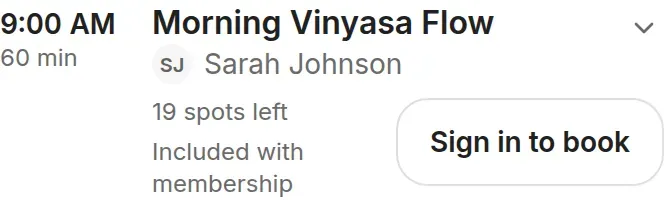
Students need a free account. They sign in once, with an email link, Google or Apple, then book with a membership or a class pack, including a single-class pass. You can embed the page on a site you already have. Open the link on your own phone before you print anything. If you cannot see the week and finish a test booking in a minute, neither can they. A teacher page is useful when students follow a person rather than the room. The booking still uses your cap, your waiver and your payments.
The yoga version of that link is in yoga studio booking software and on the yoga studio booking page. The same product covers Pilates, barre and dance. A teacher who is still one person, not yet a week of classes, may want the page for yoga teachers first.
A weekly rhythm
Put half an hour on the calendar, the same time each week, or it will lose to whoever messages you first.
- Look at the week ahead. Anything under your minimum, any teacher away, any room double-booked. Fix it while students can still change their plan.
- Write one line to each new student. Name the class they came to, and the sister class if they want a second. Do not send a blast.
- Look at who booked and did not come more than once. Injury, boredom, a level that was wrong. Notice it. Do not turn it into a speech.
- If the same class has a waitlist, write "second slot" and a date to decide.
- Then look at money. Packs running out, memberships that did not renew, a payment that failed. Who's In charges those payments on your Stripe account, so you can see the failure and talk about it.
Once a month, ask which classes carry the rent and which you are keeping because you love them. Loving a class is allowed. Pretending it is full is not. Once a quarter, ask three students who are not your friends what is confusing. It is usually the link, the price, or the words "all levels". Who came, who is active, and whether the hours you care about are full: those are the numbers that change Monday.
Where booking software fits, and where it does not
A sheet and a message are enough while you are still finding out whether anyone will come. Move when you are copying the timetable into three places and answering "is there space?" from the car. Software will not teach the class, and it will not make a bad hour popular. Its job is the week, the cap, the waitlist, the pack and the membership in your own account, the confirmation, the waiver, the check-in, and a list of who came.
Who's In Studio does that job for one studio, at the monthly price above, with the same 14-day trial and the same 0% Who's In fee (Stripe processing applies) on member payments. It fits a yoga, barre, Pilates or dance room on a weekly timetable.
It is a poor fit if you need several locations on one account, a branded app in a store, a cash register, retail, gift cards, door access, or a marketplace that sends you strangers. Who's In is not ClassPass, and it does not supply an audience. There is no text-message alert and no push alert. There is no 1:1 appointment book: a private that repeats every week can be a weekly class with room for one person, and a workshop that does not repeat is an Event. Bookings don't happen in a group chat. Share the link. The student books on the web.
If you need the things in that list, a larger platform will suit you better. Mindbody is the usual comparison when a studio wants a marketplace and a wider suite. Read the honest comparison before you assume bigger is more grown-up. A ranked view of yoga tools is on best yoga studio software. The FAQ, pricing and Who's In Studio are the pages to trust if a number ever disagrees with this guide.
If you want to try the week in the product, set up your real classes and send the link to five students you trust.
A card is taken at checkout. Nothing is charged until the trial ends. See Studio pricing for current prices and offers. 0% Who's In fee (Stripe processing applies).
Questions people actually ask
How many classes a week should a new one-room studio offer?
Start with the hours you can teach well, often somewhere between 8 and 12 classes, and add a class when an existing one is full. A timetable of quiet classes looks worse than a short timetable of classes people rely on.
Should I sell memberships or class packs first?
Sell both, and explain the membership first to anyone who is already coming every week. Packs, including a single class, are for trying the studio and for people whose week changes. If the pack is the better deal even for your most regular students, the membership will not sell.
How do I cut no-shows without becoming the strict teacher?
Put the class at a time people can keep, take payment before the day, send one clear note beforehand, publish the cancellation rule before they buy, and keep a waitlist so a freed spot is offered to someone. Look at repeat absences as people, not as a percentage to punish.
Do my students need to download an app?
No. They book in the browser from your link. They need a free account, and a membership or class pack, to book. They can add the page to their phone's home screen if they want it there.
What does Who's In Studio cost, and will the trial charge my card today?
Studio Starter is $19 a month for up to 99 active members. Growth is $49 a month with no cap. Every feature is on both. You add a card at checkout for the 14-day free trial, and nothing is charged until the trial ends. Member payments are 0% Who's In fee (Stripe processing applies).
Can one studio timetable hold yoga, barre, Pilates and dance?
Yes, if they are your classes in your room. They are weekly classes with a teacher, a cap and a description. Pilates apparatus is capped by the equipment you have. The software does not care what the movement is called.
Can I take private clients as well as group classes?
Not as appointments. Who's In Studio has no appointment book for privates. A private that repeats every week can be a weekly class with room for one person, booked with a pack. A workshop that does not repeat belongs on Events, not on the studio timetable.
What if I am not ready to pick software?
Run the week on paper until copying the timetable into three places starts to hurt. The timetable, the cap, the prices and the cancellation rule are yours either way. When you want one link, start a 14-day trial. A card is taken at checkout and nothing is charged until the trial ends.